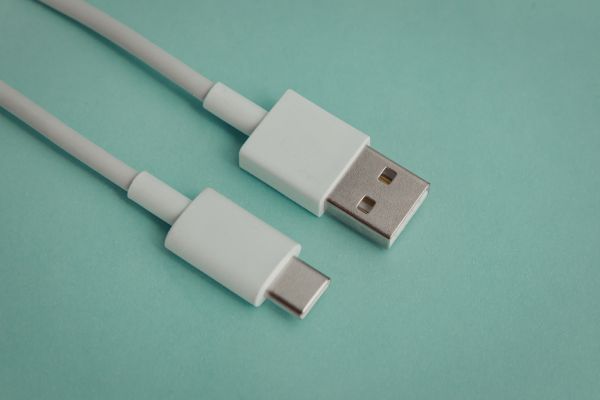
USB-C was supposed to simplify everything. One connector for phones, laptops, tablets, headphones, power banks, cameras, and just about every modern gadget that matters. And yet, somehow, choosing the best USB-C cables has become more confusing than ever.
Some cables charge fast but transfer data slowly. Others handle video beautifully but fail under high power loads. A few feel solid and last for years, while others fray or loosen after a few months of everyday use. On the surface, they all look nearly identical. In practice, they can behave very differently.
This guide takes a practical, experience-driven look at what actually separates good USB-C cables from frustrating ones, and how to choose the right cable for the devices you rely on every day.
Why USB-C Cables Aren’t All the Same
It’s easy to assume that a USB-C cable is just a USB-C cable. The connector shape is standardized, but what happens inside the cable is not.
USB-C is a physical design, not a performance guarantee. A cable might support basic charging at low speeds, or it might be capable of delivering high-wattage power, ultra-fast data transfer, and even external display output. Without checking the specifications, there’s no way to know by looking alone.
This mismatch between appearance and capability is the reason people end up disappointed. A laptop charges slowly. A phone refuses fast charging. A monitor doesn’t light up. The cable is usually the quiet culprit.
Charging Speed and Power Delivery Explained
One of the biggest reasons people search for the best USB-C cables is charging performance. Modern devices demand more power than ever, especially laptops and tablets.
Basic USB-C cables may only support around 60 watts of power. That’s fine for phones and smaller devices, but it can struggle with larger laptops. Higher-quality cables support 100 watts or more, allowing them to safely handle fast charging for power-hungry hardware.
Power Delivery, often shortened to USB-PD, plays a big role here. Cables designed for USB-PD can negotiate power levels intelligently between the charger and the device. Without proper support, charging may default to slower speeds, even if the charger itself is capable of more.
If you’ve ever wondered why your laptop charges faster with one cable than another, this is usually the reason.
Data Transfer: The Hidden Difference
Charging gets most of the attention, but data transfer is where USB-C cables quietly diverge.
Some cables are designed primarily for power, offering very slow data speeds suitable only for syncing contacts or transferring small files. Others support USB 3, USB 3.1, or USB 4 standards, which dramatically increase transfer speeds.
For anyone moving large files, backing up devices, or working with external drives, this matters. A slow cable can turn a quick task into a coffee break. A fast one makes the process feel invisible, which is exactly how good technology should behave.
Not every device needs top-tier data speeds, but knowing whether a cable supports them helps avoid unnecessary bottlenecks.
Video and Display Support
USB-C has quietly become a display connector, replacing HDMI and DisplayPort in many modern setups. One cable can now carry power, data, and video all at once.
Not all USB-C cables support video output. Those that do may support different standards, affecting resolution and refresh rate. A cable that works perfectly for charging a laptop might fail entirely when asked to drive an external monitor.
If you use USB-C to connect to displays, docks, or hubs, cable quality becomes especially important. Flickering screens, random disconnects, or limited resolution are often cable-related issues rather than device problems.
Build Quality and Everyday Durability
Performance specs are important, but build quality is what determines whether a cable survives daily life.
The best USB-C cables tend to have reinforced connectors, thicker insulation, and strain relief where the cable meets the plug. These small design choices make a noticeable difference over time, especially if the cable is frequently bent, unplugged, or packed into a bag.
Braided cables often last longer and resist tangling, though they can be slightly stiffer. Rubber or silicone cables feel softer and more flexible, but their longevity depends heavily on manufacturing quality.
A cable doesn’t need to feel indestructible, but it should inspire a little confidence when you plug it in.
Cable Length and Real-World Use
Length is another overlooked factor. Short cables are great for power banks and desk setups, reducing clutter and signal loss. Longer cables are more convenient for bedside charging or flexible workspaces, but they place more stress on the internal wiring.
High-quality cables maintain performance even at longer lengths. Cheaper ones may suffer from voltage drop, leading to slower charging or unreliable connections.
Choosing the right length for how you actually use your devices can improve both convenience and performance without any technical changes.
Compatibility Across Devices
One of USB-C’s biggest promises is universality, but compatibility still depends on cable capabilities.
A single cable might work beautifully with a phone, adequately with a tablet, and poorly with a laptop. Another might be perfect for a laptop but overkill for everything else.
The best USB-C cables are versatile without being excessive. They support enough power and data throughput to handle a wide range of devices, so you don’t need to think about which cable goes with what.
That flexibility is what turns a cable from an accessory into an everyday tool.
Safety and Certification
Poorly made cables don’t just perform badly, they can be unsafe. In extreme cases, they can overheat, damage ports, or cause charging issues that shorten battery lifespan.
Certified cables go through testing to ensure they meet electrical standards. While certification logos aren’t a guarantee of perfection, they add a layer of reassurance, especially when charging expensive devices.
When a cable feels unusually hot during use or behaves inconsistently, it’s often a sign that something isn’t right internally.
Choosing What Actually Fits Your Needs
The search for the best USB-C cables isn’t about finding one “perfect” option. It’s about matching the cable to how you live and work.
If you mostly charge a phone overnight, you don’t need cutting-edge data speeds. If you work with external drives or monitors, cable performance becomes critical. If you travel often, durability and length matter more than aesthetics.
Understanding your own usage patterns makes the decision simpler and avoids unnecessary frustration.
A Thoughtful Wrap-Up
USB-C was meant to make life easier, and in many ways it has. But the cable itself plays a bigger role than most people realize. A good cable disappears into the background, doing its job quietly and reliably. A bad one makes itself known at the worst possible moments.
The best USB-C cables strike a balance between performance, durability, and versatility. They charge quickly without overheating, transfer data without delay, and hold up under everyday wear. They don’t demand attention, and that’s exactly the point.
Choosing wisely doesn’t require obsessing over specs, just a bit of awareness. Once you’ve used a truly good cable, it’s hard to go back.